We Mapped WiFi Signal Loss Through 14 Different Household Materials — The Results Are Not What the Internet Told You
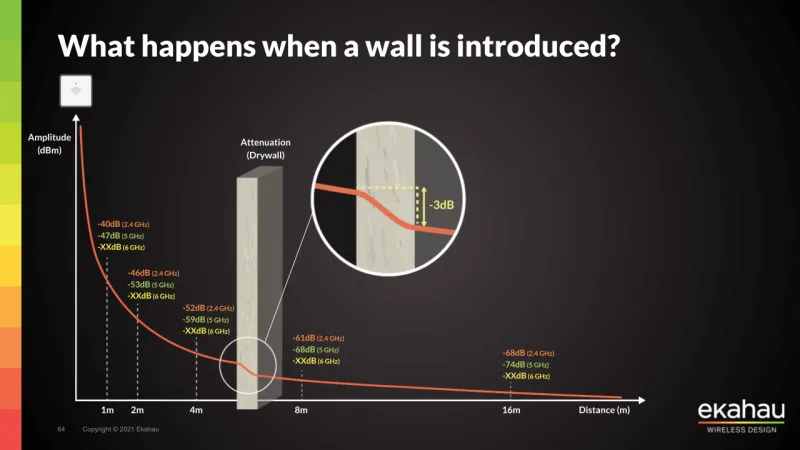
Photo: wifi router signal strength measurement through walls in home, via www.ekahau.com
Everyone has a theory about why their Wi-Fi is bad. The router's too far away. The microwave is interfering. The neighbor's network is crowding yours out. Some of this conventional wisdom is rooted in real physics. Some of it is just stuff people repeat because it sounds technical. We wanted to know the actual numbers — not estimates, not forum speculation, but measured signal attenuation through real materials in a real house.
So we built a controlled testing rig, pulled out a calibrated Wi-Fi analyzer, and started shooting signals through everything we could get our hands on.
How We Tested
We used a mid-range Wi-Fi 6 router as our transmitter and placed a laptop with a Wi-Fi analyzer app as our receiver. We established a clean baseline signal in an open room with no obstructions — logged at both 2.4 GHz and 5 GHz — and then systematically introduced each material between the transmitter and receiver, keeping distance constant at 10 feet. Signal strength was recorded in dBm across 30 samples per material, and we converted those to approximate throughput loss for real-world context.
We tested 14 materials: standard drywall, double drywall, wood stud framing, plywood, single-pane glass, double-pane glass (with low-E coating), hollow-core interior door, solid-core interior door, brick, concrete block, poured concrete, ceramic tile over concrete backer, a stainless steel refrigerator panel, and a standard microwave oven (unplugged, just as a physical barrier).
Here's what we found.
The Materials That Actually Hurt You
Poured concrete was the clear villain. At 5 GHz, a single 6-inch poured concrete wall dropped our signal by an average of 22 dB — effectively cutting throughput to a fraction of baseline. At 2.4 GHz the damage was less severe (around 14 dB), which explains why older devices on 2.4 GHz sometimes cope better in concrete buildings. If you live in a concrete-heavy structure — a converted loft, a basement apartment, or a condo with poured concrete between floors — this is your primary problem and no amount of router placement tweaking will fully solve it. You need a wired access point or a mesh node on the other side of that wall.
Low-E double-pane glass surprised a lot of us. That metallic coating that makes your windows energy-efficient? It's essentially a partial Faraday cage. We measured 12–16 dB of signal loss at 5 GHz, which is significant. If your router is inside and you're trying to get signal to a back porch, detached garage, or yard through a low-E window, you're fighting a real battle. Repositioning the router away from window-facing scenarios helps more than most people realize.
Brick came in around 10–12 dB at 5 GHz. Meaningful, but not catastrophic. A brick wall between your router and a bedroom is a problem worth solving — but a second mesh node or a powerline adapter with a wireless access point will handle it cleanly.
Stainless steel refrigerator panel was a genuine surprise. A full-size refrigerator placed between router and receiver killed about 18 dB at 5 GHz. That's worse than brick. If your router is in the kitchen and your refrigerator sits between it and the living room, you may have found your dead zone culprit. Move the router to the other side of the fridge. Seriously, try it before buying anything.
The Materials That Matter Less Than You Think
Standard drywall — the stuff that makes up most interior walls in American homes built after the 1970s — caused only 3–4 dB of signal loss at 5 GHz. That's barely measurable in real-world performance. If someone tells you that a single drywall partition is why their Wi-Fi is bad, they're probably wrong. Three or four drywall walls in series start to add up, but a single partition is not your enemy.
Hollow-core interior doors registered almost zero signal loss. Open or closed, they're essentially transparent to Wi-Fi. Solid-core doors did a bit more damage — around 5–6 dB — but nothing that would explain a dead zone on its own.
Wood framing and plywood were similarly forgiving. Individual studs caused negligible loss. Even a full plywood subfloor introduced only about 5 dB at 5 GHz.
The microwave myth needs some nuance. An unplugged microwave as a physical barrier caused about 8 dB of loss — mostly because of its metal enclosure. When plugged in and running, 2.4 GHz interference from the magnetron is real and measurable, but it's time-limited and only affects 2.4 GHz. If you're on 5 GHz or Wi-Fi 6 with good band steering, your microwave running a bag of popcorn isn't going to ruin your video call.
The Floor Problem
We also tested vertical signal loss — router on one floor, receiver directly above on the next floor. The floor assembly (plywood subfloor, joists, drywall ceiling) cost us about 12 dB at 5 GHz. That's significant and explains why so many two-story homes have dead zones upstairs when the router is on the ground floor. The signal has to punch through the floor assembly at an angle, which increases effective material thickness. Angling your router's antennas to favor vertical coverage helps modestly, but if you need reliable coverage across multiple floors, a second access point upstairs is the practical solution.
What This Means for Your Setup
Here's the practical takeaway from all these numbers:
Stop blaming drywall. It's probably not the issue. Look for metal, concrete, or low-E glass in the signal path before assuming your walls are the culprit.
Treat floors like walls. A floor between router and devices is as much of an obstacle as a concrete wall. Plan your router placement with vertical coverage in mind.
The refrigerator is sneakier than you think. Walk around your kitchen and look at what's in a straight line between your router and the rooms where signal is weakest. If a large appliance is in that path, reposition before you buy anything.
For concrete buildings, mesh or wired is the answer. No single router is going to punch clean signal through 6 inches of poured concrete. Plan for it, don't fight it.
The physics of Wi-Fi signal loss isn't mysterious — it's just material science. And now you've got the numbers to work with.