30 Days, 6 WiFi 7 Routers, One Ugly Truth: The Spec Sheet Lied to Almost Everyone
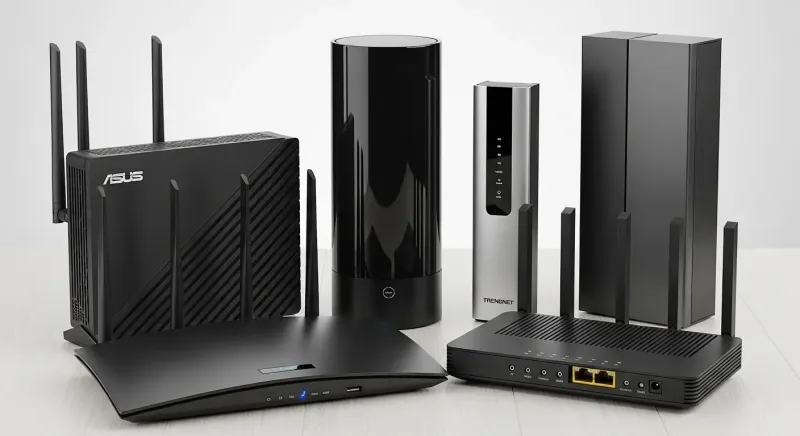
Photo: multiple wifi routers side by side comparison on desk, via wifitech.ae
We've all been there. You drop serious money on the router with the biggest numbers on the box, plug it in expecting some kind of wireless miracle, and then wonder why your video call still stutters when your kid fires up Roblox two rooms away.
That's exactly the problem we wanted to solve. So we pulled six current-generation WiFi 7 routers into our testing rotation, ran them hard for 30 days across three real homes — a 1,400 sq ft townhouse in the suburbs, a 2,800 sq ft single-family home with a finished basement, and a 900 sq ft apartment in a dense urban building — and tracked everything from raw throughput to how often people actually complained about their connection. Spoiler: the fastest router on paper caused the most headaches in practice.
We're not going to name names in the intro because the context matters. Let's get into it.
The Lineup and the Setup
The six routers we tested spanned a price range from about $250 to $700 — all WiFi 7 certified, all running the current flagship chipsets, all promising to be the last router you'll ever need. We assigned each one a two-week rotation across at least two of our three test homes, logging connection events, running scheduled speed tests every four hours, and keeping a daily log of user-reported issues from the actual people living in those houses.
Our households ranged from a retired couple with a handful of smart home devices to a family of five with gaming consoles, smart TVs, a home office setup, and enough IoT gadgets to make a network engineer nervous. Real conditions. Real people. Real frustration when things went sideways.
The Speed King — And Its Problem
One router — a $649 unit from a brand that's been dominating the enthusiast forums — posted numbers that genuinely impressed us during isolated throughput testing. We're talking multi-gig performance at close range that made our testing equipment work to keep up. On paper, it was the clear winner before we even got to week two.
Except it wasn't, not for most people.
The issue was configuration complexity. This router assumed you knew what you were doing. Its default settings were optimized for peak performance in ideal conditions, not for a household where devices range from a brand-new MacBook Pro to a 2019 smart refrigerator running firmware that hasn't been updated since the Obama administration. Automatic band steering was aggressive to the point of being counterproductive — older devices kept getting pushed to channels they couldn't handle well, and the resulting reconnection cycles drove our test households up the wall.
By day 12, two of our three test homes had asked us to swap it out early. That's not a spec sheet problem. That's a real-world problem.
The Quiet Overachiever
About $150 cheaper and roughly 15% slower in our peak throughput tests sat the router that ended up being the crowd favorite by a wide margin. Its trick? It made good decisions automatically, without requiring the user to dig into advanced settings.
Band steering was smooth and transparent. The 6 GHz band lit up for devices that could use it without kicking other devices off their stable connections. The app was genuinely usable — not just technically functional, but actually clear enough that one of our test users figured out how to set up a guest network without Googling anything. In a month of testing, this router generated exactly two user complaints, both of which were resolved by a firmware update that pushed automatically during week three.
Consistent. Stable. Boring in the best possible way.
What the Stress Tests Showed
We ran each router through a simultaneous load scenario every weekend: four 4K streams, two active video calls, one person gaming online, and background smart home traffic all running at the same time. This is the kind of Saturday afternoon that breaks routers.
Three of the six handled it without measurable degradation. Two showed throughput drops significant enough to cause visible streaming quality reductions. One — not the speed king, but a mid-range option we had higher hopes for — essentially gave up on the 2.4 GHz band under load, leaving smart home devices in a weird half-connected state that took a full reboot to resolve.
The lesson from the stress tests was pretty consistent: routers with better QoS implementation and smarter traffic prioritization held up. Raw speed headroom only helped if the software could actually allocate it intelligently.
The Apartment Problem
Our urban apartment test environment threw a wrench into a few assumptions. With over 30 competing WiFi networks visible from inside the unit, the 6 GHz band — theoretically the clean, uncrowded lane of WiFi 7 — was a genuine lifesaver for the routers that managed it well. Devices that connected to 6 GHz stayed fast and stable. Devices that couldn't use 6 GHz were fighting for space on 2.4 GHz and 5 GHz bands that looked like rush hour on the 405.
Two routers handled this environment excellently, automatically steering capable devices to 6 GHz and managing the congested bands gracefully for everything else. Two others barely seemed to account for the RF environment at all, defaulting to configurations that would've made more sense in a rural home with no neighbors.
Range: Still a Thing
WiFi 7 marketing sometimes implies that range is a solved problem. It is not. In our 2,800 sq ft home with a basement, two of the six routers simply couldn't deliver usable speeds to the far corners of the lower level without repositioning closer to the center of the house — which isn't always practical. If your home has more than about 2,000 sq ft or any kind of layout complexity, you should probably be looking at a mesh system regardless of which generation of WiFi you're buying.
For the apartment and the townhouse, all six routers covered the space adequately. But adequate coverage and great coverage are different things, and only three of the six delivered signal strong enough to take full advantage of WiFi 7 speeds throughout the entire space.
So Which One Should You Actually Buy?
We're not dropping a definitive ranked list here because the right answer genuinely depends on your home and your household. What we will say with confidence after 30 days of this:
If you want set-it-and-forget-it simplicity, prioritize routers with strong automatic management and a clean app experience over raw speed numbers. The difference between 3.2 Gbps and 2.8 Gbps peak throughput is invisible in daily life. The difference between a router that handles your mixed device environment gracefully and one that doesn't is something you'll feel every single day.
If you're a power user who wants to tune every setting and squeeze every megabit out of your connection, the high-end options with deeper configuration access can absolutely deliver — but you need to be willing to put in the work.
If you're in an apartment, make sure whatever you buy has solid 6 GHz management. That band is your escape hatch from the noise, and not every WiFi 7 router uses it equally well.
The fastest router in our shootout wasn't the best router. The best router was the one that kept five real people connected and happy for 30 days without anyone calling us to ask what was wrong. That's the bar. Everything else is just marketing.
Testing conducted across three residential locations over 30 consecutive days. Speed tests logged via automated scripts at four-hour intervals. User satisfaction tracked via daily check-ins with household members.