We Spent Two Weeks Testing Router Placement Myths — Here's What the Signal Maps Actually Showed
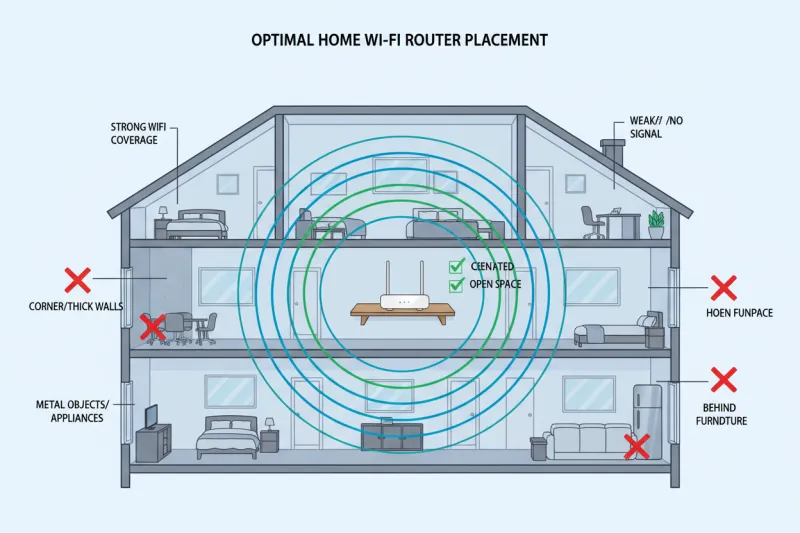
Photo: WiFi router placement home living room shelf signal, via cdn.shopify.com
Ask five people where to put your router and you'll get five different answers — usually delivered with complete confidence. "Put it in the center of the house." "Mount it on the ceiling." "Keep it away from the microwave." "Point the antennas sideways."
Some of this advice is solid. Some of it is the networking equivalent of an old wives' tale. We wanted to know which was which, so we stopped reading forums and started running actual tests.
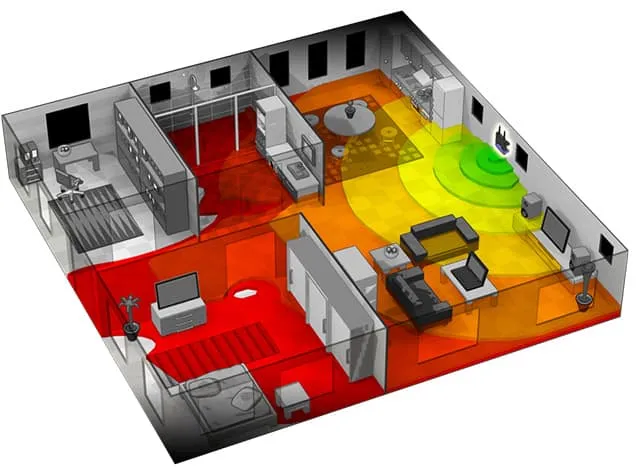
Over two weeks, we mapped signal strength across three homes — a two-story colonial in the Philadelphia suburbs, a single-story ranch-style home in Phoenix, and a mid-century open-floor-plan apartment in Denver — using a combination of Netspot Pro, a dedicated WiFi analyzer, and a consistent set of test devices. We tested eight of the most common router placement claims. Here's what we found.
Myth 1: Center of the House Is Always Best
Verdict: Mostly true, but it's complicated.
This one gets repeated so often it's practically gospel, and honestly? It holds up — in open floor plans. In our Phoenix ranch home, centering the router reduced dead zones by about 40% compared to a corner placement. Signal spread was noticeably more even across the whole footprint.
But in the Philadelphia two-story colonial, "center" is a lot harder to define, and placing the router in the geometric center of the first floor actually left the second floor with significantly weaker coverage than positioning it slightly off-center near the stairwell. The lesson: center placement is a good starting point, not a universal rule. Think about where you actually use WiFi, not just where the middle of the house is.
Myth 2: Higher Placement Equals Better Coverage
Verdict: True — within reason.
This one is grounded in real physics. WiFi signals radiate outward and slightly downward from a router's antennas, so elevating the unit does generally improve horizontal spread. In all three of our test homes, moving the router from a low shelf to a higher bookshelf or wall mount improved average signal strength across the floor plan by 8–15%.
Ceiling mounting, though? That's where it gets interesting. In the Denver apartment — a single story with 9-foot ceilings — a ceiling-mounted router actually performed worse in some corners than a unit placed on a 5-foot shelf. The downward radiation pattern became too steep, creating weak spots near exterior walls. Ceiling mounting works well in commercial spaces with lots of horizontal spread to cover. In a typical US home, a high shelf or wall mount is the sweet spot.
Myth 3: Antenna Orientation Doesn't Matter
Verdict: Busted — it matters more than you'd think.
A lot of people set up their router, leave the antennas pointing straight up, and never think about it again. That's leaving performance on the table.
External antennas broadcast signal perpendicular to their orientation. Vertical antennas spread signal horizontally — great for single-floor coverage. Angling one or two antennas at roughly 45 degrees can help push signal up to a second floor or down to a basement. We tested this in the Philadelphia home and saw meaningful improvements in second-floor signal consistency just by adjusting antenna angles — no hardware change required.
If you have a multi-story home and external antennas, this is one of the easiest free wins available to you.
Myth 4: Microwaves and Cordless Phones Kill Your WiFi
Verdict: True, but mostly a 2.4 GHz problem.
This one is technically accurate but increasingly irrelevant for most people. Yes, microwave ovens and older 2.4 GHz cordless phones can interfere with WiFi signals on that band. We confirmed real interference during microwave operation in all three test homes — but the effect was limited to 2.4 GHz and only noticeable when the device was actively running.
If you're on a modern router running 5 GHz or 6 GHz for your primary devices, microwave interference is essentially a non-issue. Where it still matters: IoT devices locked to 2.4 GHz, and in older homes where 2.4 GHz is still doing heavy lifting. If that's you, yeah, don't put your router right next to the microwave.
Myth 5: Corners Are Dead Zones for Routers
Verdict: Mostly true — but corners aren't equally bad.
The conventional wisdom says to avoid corners because signal radiates outward, meaning a corner placement wastes half your broadcast range on the walls behind it. Our tests confirmed this is generally accurate — corner placement consistently underperformed center or near-center positions in all three homes.
That said, if your corner happens to sit adjacent to the rooms you use most, the real-world difference can be smaller than the theory suggests. Signal maps don't tell the whole story. If your home office, living room, and bedroom are all clustered on one side of the house, a corner placement on that side might outperform a geometric center that's actually farther from where you spend your time.
Myth 6: Walls Don't Matter Much With Modern Routers
Verdict: Completely busted.
This one gets floated in marketing copy and we're here to shut it down. Wall material matters enormously, and no router — WiFi 7 or otherwise — has solved basic physics. In our tests, signal attenuation through a single interior drywall partition was modest. Through a concrete block wall in the Phoenix home? Brutal. We saw drops of 25–40 dBm across a single thick wall.
If your home has brick, concrete, or stucco construction, no amount of router quality will fully compensate for material interference. This is where mesh systems earn their keep — placing nodes strategically on either side of problematic walls beats any single-unit solution.
Myth 7: Routers Should Stay Away From Other Electronics
Verdict: Partially true — it depends on the electronics.
Keeping your router away from other wireless devices (baby monitors, Bluetooth speakers, older cordless phones) is legitimately good advice. We measured real interference from a 2.4 GHz baby monitor in the Philadelphia home that degraded throughput on nearby devices by nearly 20%.
But the broader claim that routers need to be isolated from electronics in general? Mostly overblown. Placing a router near a TV, a lamp, or a desktop computer didn't produce measurable signal degradation in our tests. Use common sense — distance from other wireless transmitters is what matters.
Myth 8: One Router Can Cover Any Average American Home
Verdict: Busted for most homes built after 1990.
The average new single-family home in the US is over 2,300 square feet, and that number doesn't account for multi-story layouts, thick walls, or the sheer number of connected devices the typical household is running now. In our two-story colonial test home, even a high-end single router left two rooms with signal too weak for reliable video calls.
A well-placed mesh node or a wired access point isn't an admission of defeat — it's just the right tool for the job. The "one router to rule them all" era is essentially over for anyone living in a house rather than a studio apartment.
The Takeaway
Placement matters more than most people realize, and the advice floating around the internet is a mixed bag of genuine insight and recycled nonsense. The moves that actually pay off: go high (but not ceiling-high), stay near the center of your actual usage zone, angle those antennas if you have multiple floors, and don't fight your wall materials — work around them. Everything else is probably overthinking it.